How to Fill the Front Page of an IGNOU Assignment: A Complete Step-by-Step Guide
One of the most important criteria for every IGNOU student is turning in assignments. Whether you're pursuing a bachelor's degree, master's degree, diploma, or certificate course, assignments have a big impact on your final grades. However, many students lose marks or have submission problems because they don't fill out the assignment front page correctly. The IGNOU assignment front page serves as your assignment's identity sheet, containing all the necessary information to help the university identify the student, course, and study center. Even if your assignment answers are flawlessly completed, they can cause needless delays in evaluation.
What is the IGNOU Assignment Front Page?
The cover sheet that is included with each assignment that a student turns in is called the IGNOU assignment front page. It contains crucial academic and personal data such as your name, enrollment number, course code, study center information, and session.
- Evaluators benefit from the front page:
- Determine who the student is.
- Check the subject and course.
- Transfer grades to the appropriate student account.
- Effectively assign tasks.
- When several assignments are sent in at once, avoid confusion.
- Each assignment needs to have a front page that is filled out correctly.
Information Required Before Filling the Front Page
Before you start writing the front page, keep the following details ready:
- Student Name
- Enrollment Number
- Programme Code
- Course Code
- Course Title (if required)
- Assignment Code
- Study Centre Code
- Regional Centre Code
- Mobile Number
- Email ID
- Session (January or July)
- Date of Submission
- Student Signature
Double-check these details from your IGNOU admission confirmation or student portal before writing them.
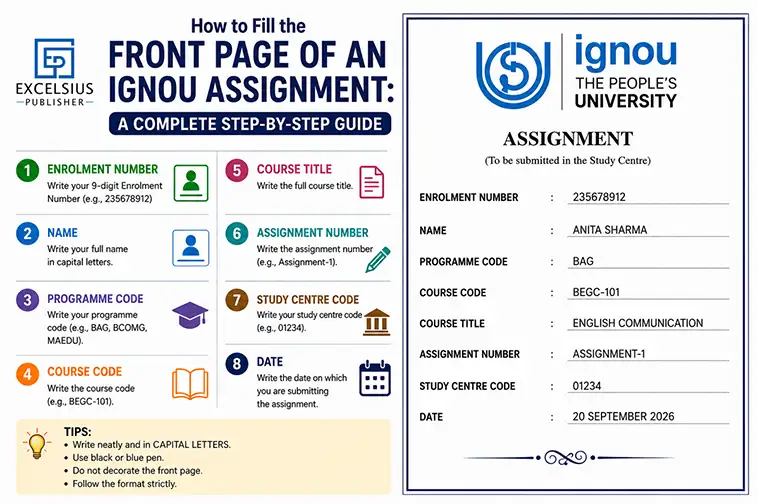
Step-by-Step Guide to Fill the IGNOU Assignment Front Page
1. Write your entire name.
Write your name precisely as it appears in your admission documents from IGNOU.
For example: Ayushi
Don't use acronyms or nicknames.
2. Type in your enrollment number.
IGNOU has given you a unique identification number called your enrollment number.
For example:
2301234567
Carefully write each number without going overboard.
3. Bring Up Your Program Code
The degree or course you are enrolled in is indicated by the program code.
Examples consist of:
BAG
BCOM, BCA, MCA, MCOM, MEG, MPS, MHD
The program code and the course code should not be confused.
4. Compose the Course Code
Each subject has a unique course code.
For instance:
BEGC-101 MCO-01 MCS-011 BPCS-183 ECO-01
Make sure the assignment you're turning in corresponds with the course code.
5. Bring up the assignment code.
There is a unique assignment code for each assignment booklet.
For instance:
Code of Assignment: BEGC-101/TMA/2026
The assignment code should always be copied exactly as it appears in the assignment question booklet.
6. Enter the code for the study center.
The IGNOU study center where you are enrolled is identified by your study center code.
For example:
- Code for the Study Center: 1505
- It is available on:
- ID card for IGNOU
- Confirmation of admission
- Portal for students
7. Bring up the regional center.
Put the name or regional center code in writing.
For instance:
Regional Center Code: 38 or Regional Center: Delhi-2
8. Go into the session
Bring up the admissions process.
For instance:
July 2025–January 2026
This field should never be left empty.
9. Write Your Contact Information
Give:
Cell Phone Number
Email Address
These details may be used if there is any issue regarding your assignment.
10. State the Submission Date
Indicate the precise date that you are turning in the assignment.
For example: September 15, 2026
11. Sign the task
Sign in the space provided.
Unsigned assignments could lead to issues with verification.
Sample Format of IGNOU Assignment Front Page
The following details should be on your front page:
- Student's name
- Enrollment Number
- Code for the Program
- Code of Course
- Code of Assignment
- Study Center Code
- Regional Center
- Meeting
- Cell Phone Number
- Email address
- Submission Date
- Signature of the Student
- Use black or blue ink to write everything correctly.
Tips for Filling the IGNOU Assignment Front Page
- To guarantee a seamless submission, adhere to these best practices:
- Make sure your handwriting is readable and clear.
- Whenever possible, use uppercase letters.
- Don't overwrite or cut.
- Before writing, check each code.
- Attach a separate front page for each course assignment.
- Keep a photocopy or scanned copy before submission.
- Use the latest assignment booklet for your session.
- Staple the front page securely to your assignment.
Each course assignment should have its own front page attached. Before submitting, save a Xerox or scanned copy. For your session, use the most recent assignment booklet. Securely staple your homework to the top page.

Final Checklist Before Submission
Before turning in your IGNOU assignment, make sure that:
- You're right about your name.
- The enrollment number is correct.
- The program code is accurate.
- The course code corresponds to the topic.
- The assignment code is accurate.
- The code for the study center is accurate.
- There is a mention of the session.
- There are contact details available.
- There is a signature.
- The submission date is written.
After everything has been confirmed, safely attach the front page and turn in your work before the due date.
Conclusion
Correctly completing the IGNOU assignment front page is equally as crucial as producing high-quality assignment responses. A properly completed front page guarantees that your assignment gets to the right assessor and that your grades are updated right away.
Before submitting, always confirm your enrollment number, program code, course code, assignment code, and study center information. You can steer clear of typical blunders and guarantee a seamless assignment submission approach by adhering to the procedures and advice provided in this tutorial.
Keep in mind that a well-organized, precise, and comprehensive front page shows your attention to detail and facilitates the review process.
Frequently Asked Questions (FAQs)
Q1. Is the front page of the IGNOU assignment required?
Indeed. The front page of every IGNOU assignment must be completed correctly. The identification and grading of assignments that are turned in without a front page may take longer.
Q2. Can I do several assignments using the same front page?
No, each course assignment should have a unique front page with the appropriate assignment code and course code.
Q3. Where can I obtain the front page format for the IGNOU assignment?
The official front page format is available for download on the IGNOU website or at your study center. Using the necessary fields, many students also manually produce the same format.
Q4. Is it possible to type the front page rather than write it by hand?
Yes, provided that your study center allows it.
Q5. What occurs if I enter the incorrect course code?
Assignment misplacement or evaluation delays may result from an inaccurate course code. Before submission, always check the code in your assignment booklet.
Q6. Should I bind or staple my assignment?
Stapled assignments are accepted at the majority of study centers. Generally speaking, unless your study center specifies otherwise, spiral binding is not necessary.
← Back to All Articles